Rules, rounds and scoring
How to play Sucker Punchline
One screen shows the fight, every player uses their own phone. Each round, two fighters answer the same prompt and everyone else votes for the funnier line. After two rounds comes the Main Event. Most points takes the belt. A game runs up to 8 to 13 minutes at normal speed, less when everyone answers early.
- 3 to 8 fighters
- Crowd up to 200
- 8 to 13 minutes
Updated
Start a fight
On a phone, START makes this phone the game screen: it shows the game and does not play.
START A GAMEThis screen shows the game: put it on the TV or share it on a call. Everyone plays on their own phone. Free, no accounts.
To play too, open
suckerpunchline.tv
on a laptop, TV or tablet and press START there.
No TV or laptop? Start here, then mirror this phone to a TV (AirPlay or Chromecast) or stand it up where everyone can see it.
3 to 8 players plus a crowd of up to 200. Alone or with one friend? AI fighters fill the ring.
Setup (one minute)
- Open the game on the big screen
On the device everyone can see (a laptop on the TV, a smart TV, an iPad or a phone mirrored to a TV), open suckerpunchline.tv and press START. A four-letter room code and a QR code appear. Which screen to use.
- Join on your phone
Scan the QR code, or go to suckerpunchline.tv and type the code. Pick a ring name (up to 12 letters) and a fighter. Nothing to install, no account.
- The first player runs the show
Whoever joins first is the Show Runner (the host): their phone has START, the settings, and the controls to skip, hide an answer or remove a player. When at least 3 fighters are in, the Show Runner taps START THE FIGHT.
A round
1. Write
Every fighter gets two prompts on their phone, and each prompt is shared with exactly one other fighter. You have 80 seconds to write both answers, up to 70 characters each. Stuck? Tap SPARK for an angle to start from. Run out of time and the game fills in the prompt's house answer for you, which scores half.
2. Fight
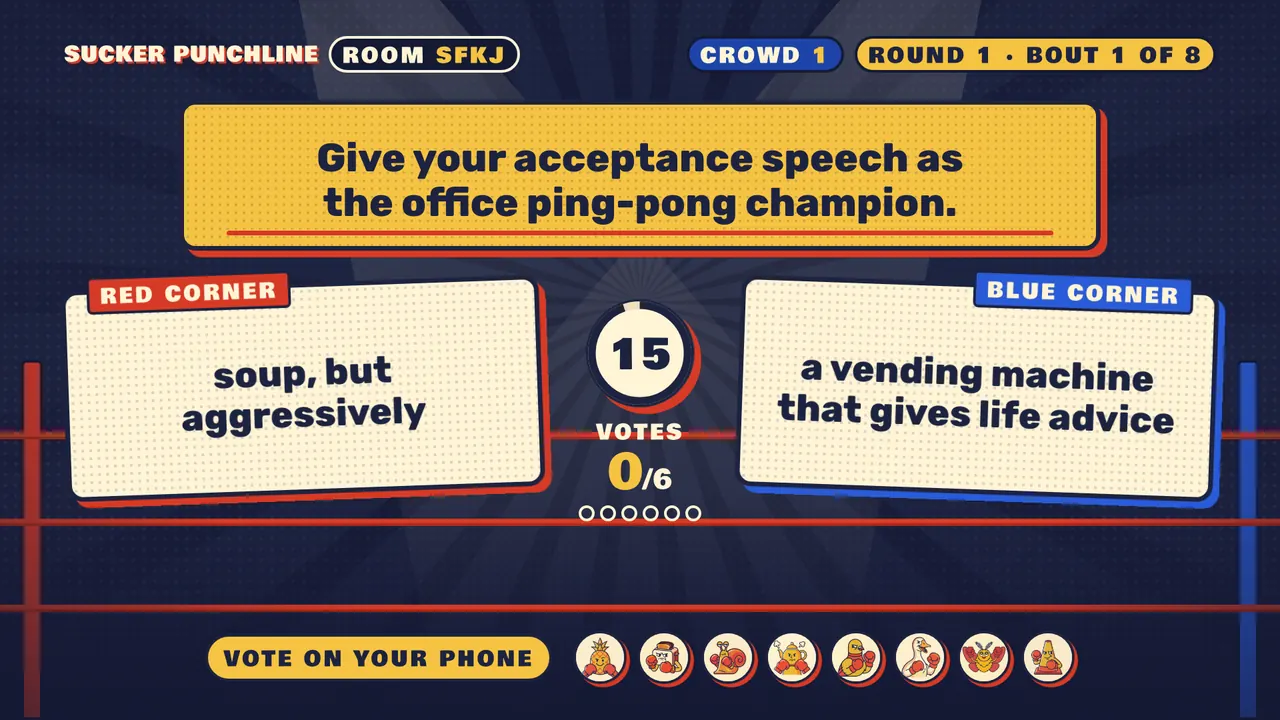
Each prompt becomes a bout on the big screen: red corner against blue corner. The prompt and both answers are read aloud. Everyone who did not write that prompt has 15 seconds to vote on their phone for the line that got the laugh. Nobody sees who wrote what until the votes are in.
3. Score
Each vote is worth 100 points in round one and 200 in round two. If every fighter who voted picked the same side, and at least two voted, it is a KNOCKOUT: a bonus of 100 points times the round number. A tie splits the points. After every bout the standings update on the big screen.
The Main Event
After two rounds, everyone answers the same final prompt (60 seconds). Then every fighter gets 3 punches to throw at the answers they liked most. Stack them all on one answer or spread them out; you cannot punch your own. Each punch is worth 300 points, so the Main Event can flip the standings.
The top score takes the belt on the podium. If two fighters tie, the one with more knockouts wins; if that is also tied, they share the belt. The Show Runner can tap PLAY AGAIN for a fresh game with new prompts and the same people.
The crowd
The ring holds 8 fighters. Anyone who joins after that (or taps "Just watch (and vote)" on the join screen) joins the crowd, up to 200 people. The crowd votes in every bout and throws punches in the Main Event. Together, the whole crowd counts as one extra voter, split by how it voted, so it can tip a close fight without deciding every bout on its own.
Playing with fewer than three people
A bout needs voters, so the game needs 3 fighters. Alone or with one friend, the Show Runner adds AI fighters (up to 5) from the lobby on their phone. AI fighters answer from a pool of pre-written lines, vote and throw punches too (with a slight lean toward human answers, so a small group can win), and give their seat to a real person who joins. No language model writes answers during play; the voices that read answers aloud are text-to-speech (see Privacy).
Settings (Show Runner's phone, in the lobby)
- Rating: Family (only family-safe prompts), Balanced (the default, adds work, dating and roommate prompts) or After Dark (adults only: the Show Runner confirms everyone is 18 or older, about two thirds of each round come from an adults-only set, and the TV and phones switch to a late-night look). More for families.
- Call-outs: some prompts name one player in the room and make up something silly about them. At most one per round, only with 3 or more human fighters, never an AI fighter or the crowd. On by default; the Show Runner can turn them off, and every player picks Pick me, Sure or Never on their own phone.
- Swear filter and slur filter: mask those words in answers. The swear filter is on by default in Family and Balanced and off in After Dark; the slur filter is on by default in every rating. Names are always filtered.
- Timers: normal, 1.5x or 2x, for slower typists, younger players or a video call with lag.
- Crowd: let extra people join as the crowd, or not.
- AI fighters: 0 to 5.
On the big screen
The host screen never needs a click after the lobby. Its corner controls (move the mouse or tap the screen to show them) have mute, volume, the voice that reads answers, a switch to stop reading answers aloud, and fullscreen where the browser allows it.
Questions
What happens if my phone locks or I lose signal?
Open the page again and you are back in your seat with your score. If a fighter is gone for two writing rounds in a row, they are benched so the game keeps moving.
What if the big screen reloads?
The show pauses for everyone and picks up where it was. No answers are lost.
Someone wrote something awful. What can I do?
The Show Runner can hide any answer on screen with CENSOR during the vote, or remove a player from the roster on their phone at any time; that player's answers are hidden too. The Family rating and the swear and slur filters help before it happens.
Can the same group play again?
Yes. PLAY AGAIN keeps everyone in the room and deals fresh prompts that have not been used in that room yet.